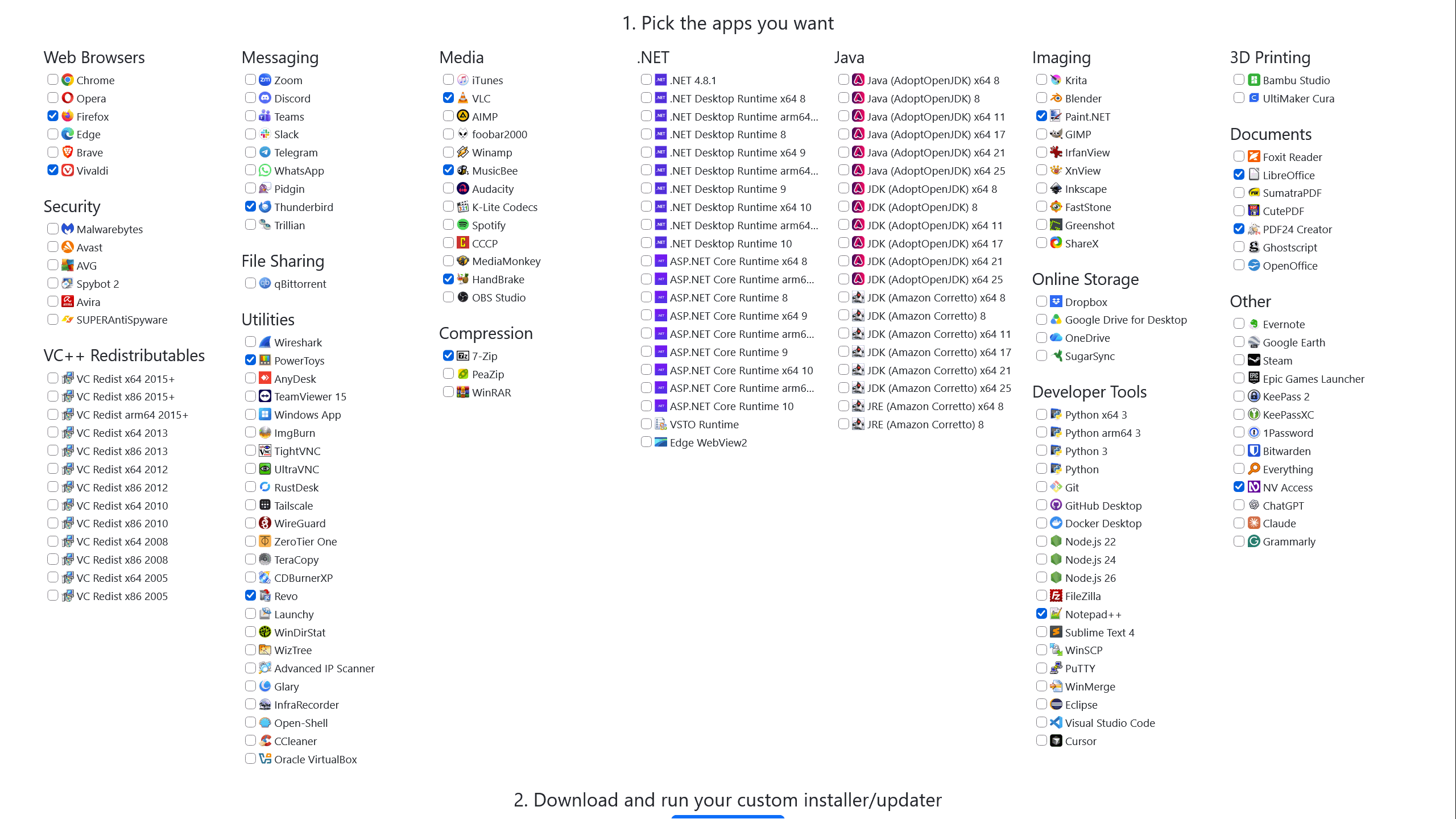
How to do it
You can install multiple applications in a single go. The procedure is:
- Visit the website ninite.com
- Check the apps you want to install or update.
- Download and run your custom installer.
Ninite will check for apps that need to be installed or updated and do the rest. If an app is already installed in its latest version, Ninite simply skips to the next. You won’t waste bandwidth downloading unnecessary updates.
My personal recommendations
Web Browsers
- Firefox – Respects your privacy and is also available for Android and Apple devices. Does have optional AI features like translation.
- Vivaldi – A feature rich, privacy respecting Chromium browser, build in Europe. No AI, no crypto, sensible defaults. Supports extensions.
Messaging
- Thunderbird – Email and calender app for Windows, Linux, Mac and Android. Feature rich, robust and highly extendable. No ads, no tracking.
Utilities
- PowerToys – A large collection of utilities for power users and developers. I personally like Keyboard Manager and Power Display.
- Revo Uninstaller – Many applications leave files on disk and entries in registry after uninstalling. Revo scans for and deletes these leftovers.
Media
- VLC – Media player that works with all modern codecs including h.264, MKV, WebM etc. A tool you will also find for all your platforms.
- MusicBee – A versatile music player and organiser that can rip your CD collection as MP3 files, tag and sync your offline music with your phone.
- Handbrake – Converts and compresses your video files to the aforementioned formats and codecs. Goes hand in hand with VLC.
Imaging
- Paint.NET – A lovable little image editor that opens in a snap. You can crop, scale and optimise your images for the web. Supports WebP.
Compression
- 7-Zip – The best open source file compression program for Windows. Handles all the formats the built-in zip function in Windows does not.
Documents
- LibreOffice – Opens the Microsoft Word files that finds their way into your email inbox. A solid office application. Can create accessible PDF’s.
- PDF24 – Tools for doing everything PDF offline, including view, annotate, merge, split, convert, compress and sign, sheeply!
Developer tools
- Notepad++ – A minimalist but competent text editor with syntax highlighting. Perfect for quick HTML/JS/CSS/XML editing.
- FileZilla – The classic FTP client. Still updated and probably the most robust program for FTP file transfer. Rarely needed, but great to have.
Other
- NVDA – If you build websites, you should test them with keyboard and screen reader. NVDA is a free screen reader for Windows.
Applications not available on Ninite.com
The following programs are not on Ninite.com, but are worth mentioning:
- Signal – An excellent open-source messaging app not owned by Meta. If you value privacy, try Signal for your text and video conversations.
- O&O ShutUp – Stop Microsoft collecting data about your computer usage (telemetry). Turn off Cortana, Onedrive and ads in the start menu.
Should you install free antivirus?
Probably not. Many free antivirus programs unnecessarily burden your computer, are loaded with ads, and can add unwanted functionality to Windows. The typical user is sufficiently protected with some simple precautions:
- Leave the built-in antivirus and firewall active.
- Use a standard user account in everyday life, not administrator account.
- Use licensed or open source software, never pirated copies.
- Keep your system updated.
- Maybe check the apps you download on VirusTotal.com
Combined with a regular backup of the data you don’t want to lose, you’re in good hands. If you feel more comfortable with a 3rd party antivirus, pay for it.